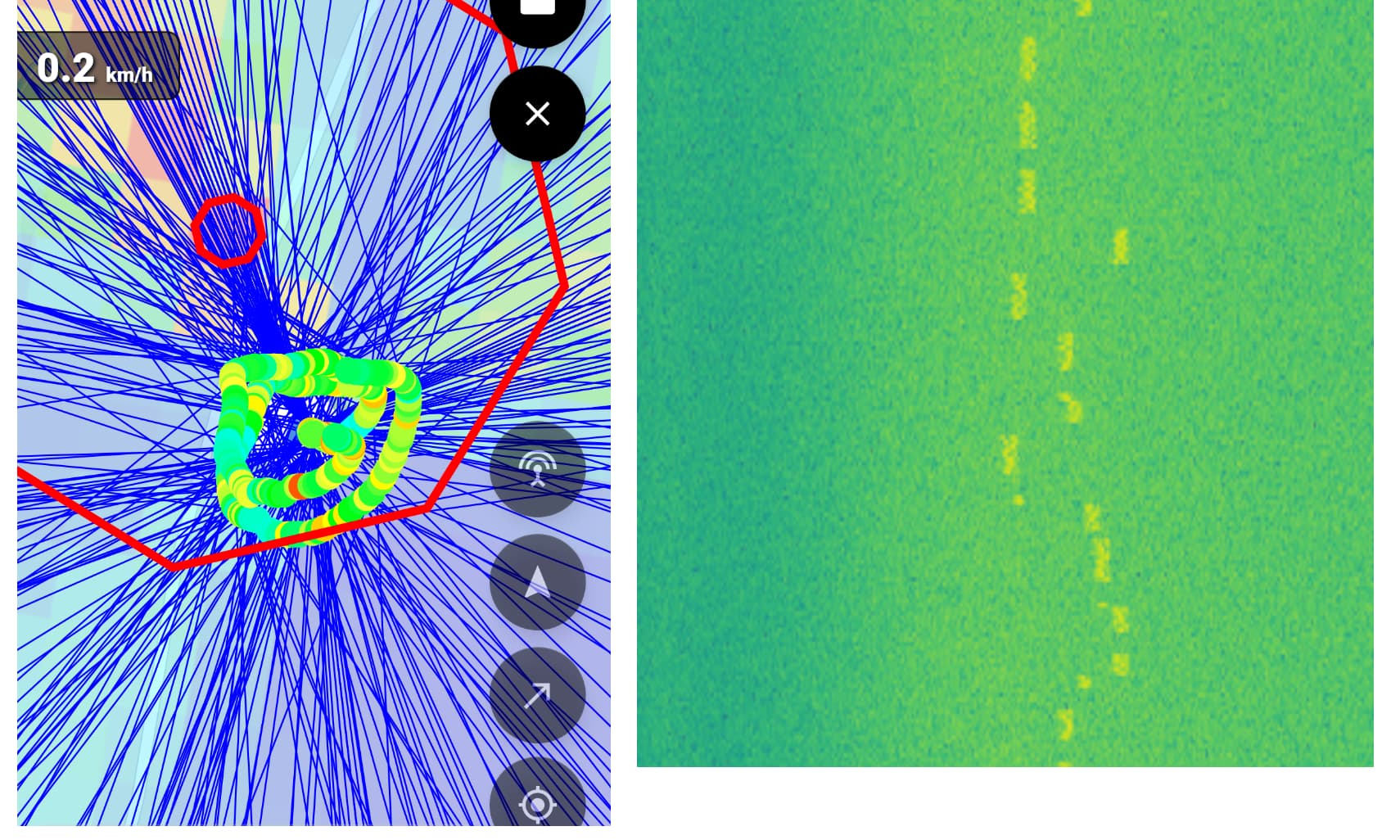
Hi everyone! We are trying to use Kraken on a drone, with the task of the radio source localization. We use all 5 antennas in a circular array with original cables. Radius is calculated as recommended. The target frequency was 866 Mhz. Spectrum analyzer from Kraken Web UI can recognize when the source is on or off, and we adjusted the quelch feature above the noise level.
As you can see on the screenshot, it detected the source outside of the path we flew, but actually the transmitter was inside this circle. Also this direction and localization estimate (but more far away) was shown before the flight when the system was just started. The whole output also seems very noisy.
Important to mention that antennas array is located above all other parts of the drone, but there is a battery places in the middle of the array around 3 cm high (could it be a reason for multipath or other issues?)
What could be the reason for the poor results? Maybe nature of the signal (it’s not continous, but has some “spikes”, see another image)? Interference with the drone video transmission system? Battery placement inside an array? Some other possible reason?
One issue with a drone may be that the Kraken expects the platform to be moving always forward, not sideways like a drone can. If you’ve been flying laterally, this would mess up the GPS movement vector results. If you can, try to ensure the drone flies more like an airplane, straight only.
Another issue is that if you’re practically flying on top of the signal source, then the angle it measures will be distorted. A circular array has no height information to it, so the array expects to see a signal coming from the horizon. If it comes from the bottom/top, or at a low angle, the cross-section that the signal cuts through the array will mean that the array is operating at a very small and very distorted aperture. So try flying further away, or lower, so that the angle of incidence with the transmitter is closer to zero.
Finally from the image, it looks like you have a lot of bearings pointing in the same direction (where the red circle is). Perhaps you might have been recording for a long time while the drone was stationary on the ground? Ensure pause when stationary is on (if you’re using the app), and only start the DoA logging when you actually take off and start moving. Alternatively, you can edit the excel data, and delete the initial period where you were not moving with the drone.
Multipath is definitely the ‘final boss’ of direction finding! I’ve seen this happen a lot in suburban areas where the signal bounces off every roof in sight. Have you tried taking the rig to a more open field or a higher elevation? Usually, getting a clearer line-of-sight helps the Kraken algorithm settle down and give you that nice clean ‘point’ you’re looking for.