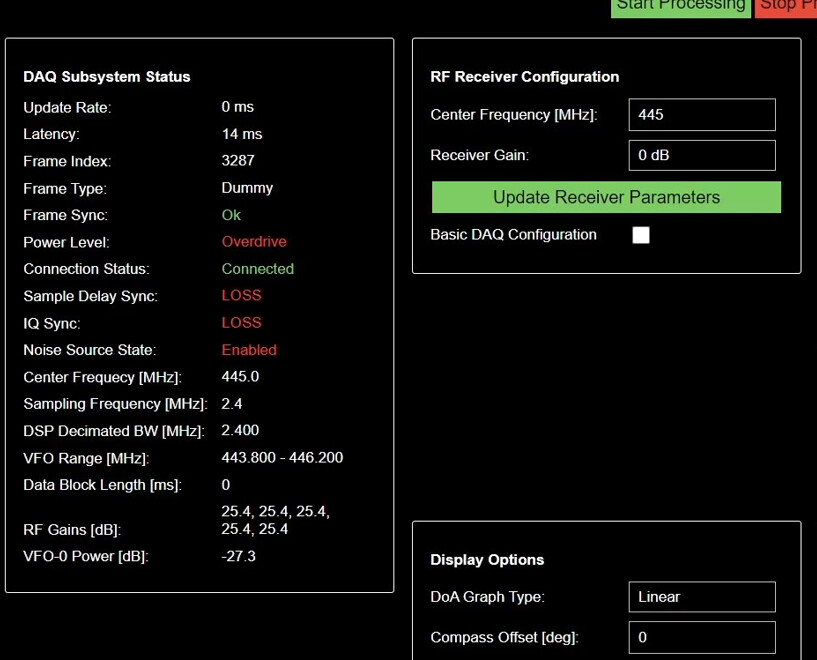
I am having issues with heading data, so i wanted to use external compass for that, is there any specific compass i need to buy or any USB based compass will work fine as i will connect it to PI4. BTW i am considering to buy Rion HCM375B-232-68-N.
secondly, which of the below will provide that USB compass data and it will be helpful if someone explain these and whats difference b/w them.
11. GPS Heading,
12. Compass Heading (if available),
13. Main Heading Sensor Used ("GPS"/"Compass"),
Unless gpsd supports it as part of a GPS device, external compass isn’t supported. What exactly are the problems that you are having with heading?
GPS heading is the heading generated from GPS data, which is only available when moving.
Compass heading is the heading generated from the compass on the Android device
Main heading sensor used is the sensor that was used during data collection (most often GPS)
I am integrating the KrakenRF system onto a UAV. In my configuration, Kraken lacks GPS and Compass data from the Android device. To address this, I incorporated an external GPS into the Raspberry Pi, and gpsd successfully recognizes and provides latitude and longitude to the system. However, it does not supply heading information. To resolve this, I added an external Compass to the Raspberry Pi. Unfortunately, this introduced issues such as displaying “frame type: Dummy,” “IQ sync: loss,” and “latency: way too high” on the Web GUI, as evident in the attached screenshot.
Additionally, upon system reboot, it starts correctly. However, when changing the center frequency and clicking on “Update Receiver Parameter,” issues arise.
Unfortunately any other USB device used on the same Pi 4 can end up causing issues if it ends up congesting the USB ports, as the Kraken relies on uncongested USB ports to maintain sample sync.
Usually with an external GPS the data rate is so slow that it causes no USB congestion, but it’s possible that your external compass has a fast data rate that cause issues. Is there any setting for the compass where you can throttle the output rate?
Also I do not think that gpsd supports most external compasses.
I adjusted the time interval for compass data reading, but the issue persists.
When testing the same setup (external GPS, external Compass, identical compass data reading code) in a virtual machine (VM), the problems (“frame type: Dummy,” “IQ sync: loss,” and “latency: way too high”) do not occur.
However, I need this configuration to work on a Raspberry Pi (PI) for implementation on a UAV. What might be causing the issue, and what steps should I take to address it?
One thing to try is to upgrade to a Pi 5, since on that the USB hardware is supposedly upgraded.
Also, are there any other output modes for your compass? Can you connect the compass to the UART pins on the Pi to avoid having to use the USB?
I’m know the post is a little late, but you are kinda playing apples and oranges here.
True North and Magnetic North can be very different things.
1 Like
That’s a tricky one! Dealing with high-speed radio and extra USB peripherals on the Pi 4 can be a nightmare due to that shared USB/Ethernet bus.
Since your compass is the Rion HCM375B-232 (which suggests an RS-232/Serial interface), have you tried connecting it directly to the Pi’s UART pins instead of using a USB adapter for it?
Bypassing the USB bus for the compass data completely might be the only way to get rid of that “IQ sync: loss” error and the latency issues, as it takes the congestion out of the equation.
You may also find this free tool helpful. https://123compass.org/
I’m yet to have the time to test external compass yet, but I would assume modern units that combine compass and GPS automatically adjust for declination? If not we’ll just have to provide a way to enter location and calculate declination.